.svg)
.svg)
This guide evaluates the top five enterprise FP&A platform alternatives to Board EPM in 2026—Drivetrain, Anaplan, Pigment, Workday Adaptive, and OneStream. It compares each on deployment speed, modeling flexibility, AI maturity, integrations, and ease of use to help CFOs select the right solution for complex enterprise planning needs.
.svg)
.svg)

.svg)

Search for “Board alternatives,” and you’ll find the usual roundup. Although these tools technically check the boxes, they weren’t built to handle the complexity of enterprise planning. Many of them were designed for small and mid-sized businesses or repurposed BI tools retrofitted with FP&A features.
And that’s okay. But if you're leading finance at a large enterprise, you're not looking for close enough alternatives. You’re looking for a platform built to handle real enterprise complexity that’s fast to adopt, and that doesn’t collapse under the weight of your data or organizational structure.
This guide is structured around what CFOs of large enterprises look for when they’re considering Board alternatives—time to value, modeling flexibility, integration depth, scalability, governance—and how the top five Board competitors (ourselves included) stand out in those areas. We’ll also look at their AI maturity, which we expect to be a key factor in software selection in 2026.
What is Board software?
Board falls into the category of enterprise performance management (EPM) platforms, often used by large, multi‑entity organizations that need to standardize planning and analysis across teams, regions, and business functions. Board EPM is commonly adopted by enterprises moving away from spreadsheet‑driven processes and looking for a single place to coordinate their financial and operational plans.
Key Board FP&A features
- End-to-end planning and forecasting: Covers strategic, operational, and financial planning in one centralized platform.
- Multi-entity deployment: Supports varied planning structures across global business units.
- Built-in reporting and dashboards: Offers centralized analytics, though customization often requires technical support.
- Workflow and audit governance: Supports structured approval chains and version tracking across planning cycles with granular user permissions.
- Data connectors and Excel integration: Integrates with core systems (ERP, CRM, HRIS) and supports Excel-based workflows.
AI-powered features and capabilities
Most of Board’s AI features are relatively new and still evolving. As of this writing, several of its AI capabilities require additional licensing and may not be fully integrated into day-to-day workflows.
- Finance-specific AI agents: Help identify anomalies, explain variances, and generate forecasts inside planning flows.
- Predictive forecasting engine: Applies machine learning to time series data for more accurate, faster forecasts.
- Scenario simulation and variance analysis: Allows teams to test what-ifs and trace performance shifts with AI assistance.
- Macroeconomic signal tracking: Links external market data (via Board Signals) to forecasts for more forward-looking planning.
- AI-powered narrative summaries: Adds auto-generated explanations to dashboards and reports to reduce manual commentary.
Why choose Board Software?
Much of our Board software review is based on what we’ve learned from real user feedback from Gartner and G2. Enterprises with unique business models—whether due to global footprints, diversified product lines, or complex operational structures—often choose Board because it doesn’t force them into rigid templates.
According to users, one of Board’s biggest strengths lies in the amount of control it gives teams to shape their own planning environment. Finance teams can design complex, driver-based models tailored to their business, along with their own processes, rules, and planning structures in a unified system.
This makes the platform appealing for companies with specialized planning needs or organizational structures that don’t fit into pre-built templates.
What to consider before choosing Board?
While Board EPM supports a high degree of customization, it also requires careful consideration of internal skillsets. It is a very complex platform to configure, which is why most enterprise teams must rely on dedicated administrators or external partners to maintain the models, workflows, and reports they’ve built. Users also note that it’s not an easy platform to learn.
Integrations are another issue. Many users report problems when integrating with source systems. Some point to the limited number of integrations that Board software offers. Several users complain that integrations are difficult to set up and that they are forced to rely on middleware or manual workarounds, which likely explains why some users report broken or never-functional data flows.
Given the effort required to configure models, workflows, and integrations, enterprises shouldn’t expect a plug-and-play rollout. On the contrary, many organizations report a deployment window of around five months, with full adoption and return on investment closer to 20 months. Before choosing Board, it’s important to make sure your team can handle the technical and operational upkeep it requires.
Here are some other things to watch out for if you’re considering Board:
- Customization comes with a complexity tax. Even small changes often require developer input, making it increasingly difficult to maintain the model over time.
- Performance degrades at scale. As data volume grows or models get more layered, the system slows down. Several users noted that even adding just a few filters or dimensions can result in a performance hit.
- Reporting slows teams down. Board’s report builder lacks modern drag-and-drop capabilities, creating or updating dashboards is cumbersome, and visuals often require technical help.
- Licensing can be confusing. Some finance teams described user permissions and pricing tiers as difficult to understand, making it harder to determine how to adopt it across departments.
Top 5 Board EPM alternatives
Board gives you control, but you pay for it with long implementations, steep learning curves, and heavy reliance on technical teams. When models break or reporting slows down, many CFOs start looking for a platform that’s just as powerful but easier to run.
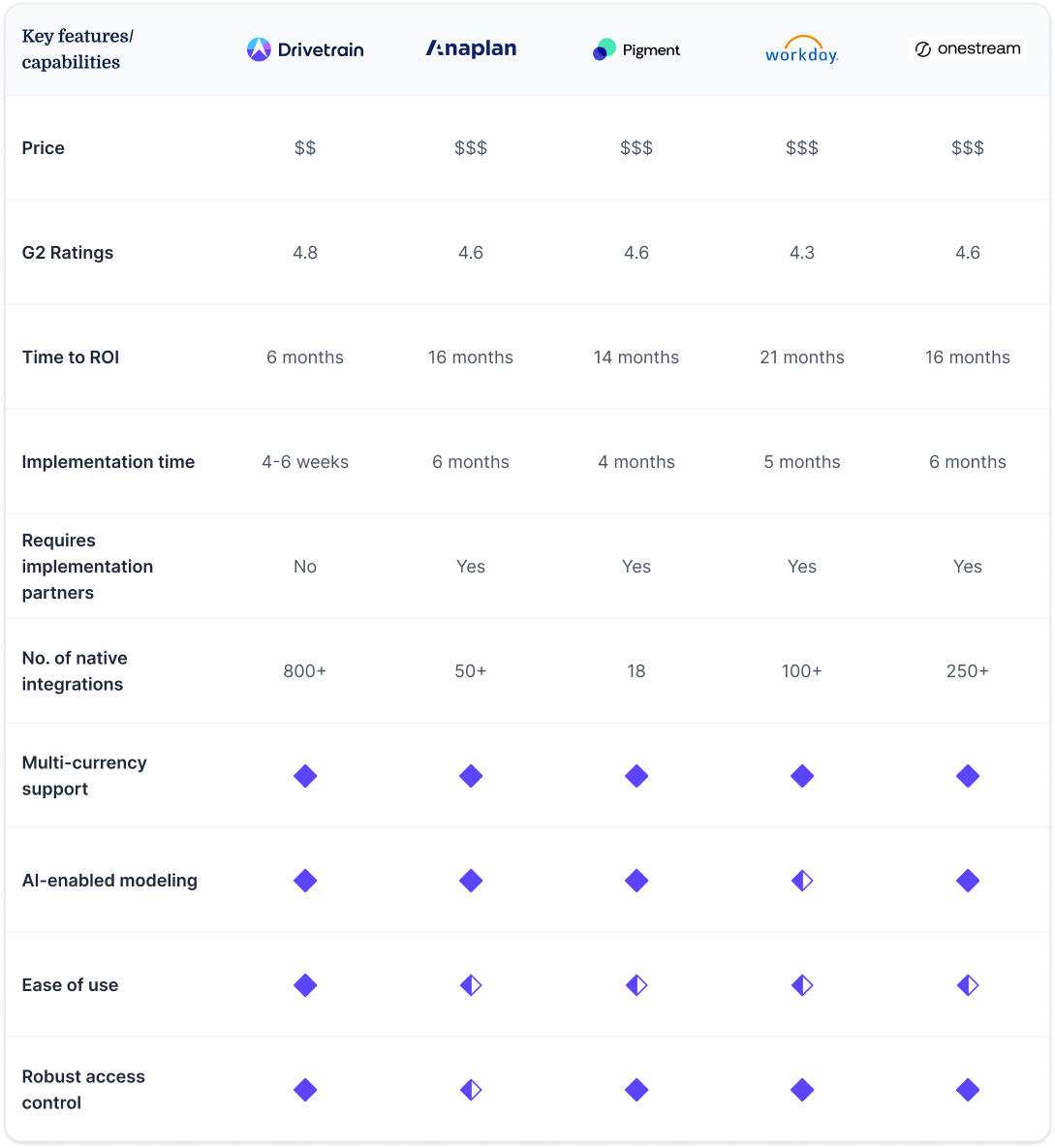
That’s why we’ve curated this shortlist of enterprise-grade, AI-powered FP&A platforms most often considered by teams moving off Board: Drivetrain, Anaplan, Pigment, Workday Adaptive, and OneStream. All support core planning and reporting but differ in how fast they go live, how much of the day-to-day use and maintenance of the system finance can own, and how well they scale across complex, multi-entity organizations.
You’ll find these discussions following the table below, which provides a quick overview of some other key features and factors to consider.
Drivetrain
Drivetrain is an AI-native, enterprise‑grade financial planning and analysis (FP&A) platform built for large, multi‑entity businesses that need real‑time forecasting, flexible modeling, and automated workflows without the technical expertise typically required by traditional EPM platforms. It’s designed for finance organizations that have outgrown spreadsheets and legacy tools and want a single system of record across ERP, CRM, HRIS, and operational data sources. Large enterprises use Drivetrain to standardize planning, shorten forecasting cycles, and enable cross‑functional alignment with a shared, governed data model.
Unlike legacy systems that require months of configuration and ongoing reliance on IT or third‑party consultants, Drivetrain emphasizes a finance‑first experience: a platform that’s easy to adopt and purpose-built to reduce manual work. This means that even complex planning processes—multi‑currency forecasts, driver‑based models, workforce planning, and scenario simulations—can be deployed and owned by finance teams without constant technical support.
That ease of adoption doesn’t come at the expense of depth, either. Drivetrain’s architecture supports enterprise needs from multi‑entity consolidations to dimensional driver logic, while its intuitive interface helps teams work faster and with fewer errors. Most implementations go live in 4–6 weeks, and many customers realize measurable value as early as six months to ROI—well before many traditional FP&A systems deliver first value. The platform also unifies data and logic so updates, scenarios, and reports remain consistent across departments.
At the same time, Drivetrain doesn’t hide complexity behind rigid templates or buried scripting languages. Teams gain the control they need and the flexibility to adapt models and workflows themselves. This reduces ongoing administrative burden and enables finance teams to focus on analysis and strategic insights.
Key FP&A features and capabilities
- Flexible modeling and scenario planning: Build driver‑based, multi-dimensional models that adapt to complex business structures without heavy scripting.
- Reporting and dashboards: Embedded reporting with dynamic dashboards tied to governed data so finance teams can build and distribute insights without IT.
- Deep integrations: 800+ pre‑built connectors to ERP, CRM, HRIS, billing, and data platforms unify data flows and reduce manual reconciliation.
- Workflow and governance: Structured review, approval, and versioning support compliant planning cycles across business units.
- Strong multi‑entity support: Consolidate plans and forecasts across global entities, currencies, and business units with auditability and traceability.
How does Drivetrain use AI?
Drivetrain is an AI-native FP&A platform, meaning that its AI capabilities—collectively known as Drive AI—are embedded in its core workflows:
- Data transformations: Users can transform their data to make it model-ready in seconds using simple English prompts.
- One‑click model generation: Automatically builds flexible baseline models from connected systems, which can then be tailored as needed.
- Natural language transformations: Users can make model adjustments using plain‑English commands.
- Anomaly detection: AI continuously scans for outliers or unexpected variance and sends automatic alerts to teams.
- AI Analyst: Finance users ask questions like “Why did revenue growth slow this quarter?” and receive contextual insights.
- Scenario suggestion and automation: AI assists with generating what‑if scenarios based on historical patterns and business logic.
Board vs. Drivetrain
When CFOs evaluate Drivetrain as a Board alternative, the choice often comes down to how it fits the reality of how their business runs. Board is highly customizable but typically demands months of implementation and ongoing technical maintenance, along with specialist expertise.
In contrast, Drivetrain is built to handle enterprise complexity but designed for finance-owned FP&A. The platform’s architecture is engineered for scale with a flexible yet disciplined data model and a powerful calculation engine—both of which enable Drivetrain to meet both the complexity and performance needs of enterprise today.
Another key differentiator is Drivetrain’s approach to the user experience. The platform was designed from the ground up with finance teams in mind. With Drivetrain, you get an intuitive, easy-to-use UI, Excel-like formulas to make modeling simple, interactive dashboards that are easy to customize, and a broad ecosystem of native integrations that finance teams can install and configure themselves.
As a result, Drivetrain offers much faster onboarding, easier adoption, and far less overhead than Board because it doesn’t require costly third-party support for either implementation or ongoing maintenance.
What users say about Drivetrain
On G2, enterprise finance teams consistently highlight Drivetrain’s ease of adoption. Many note that Drivetrain’s automated modeling and scenario tools have accelerated planning cycles and cut down reliance on manual spreadsheets or custom scripts, enabling more strategic analysis during decision cycles.
Drivetrain is the FP&A solution that actually empowers finance professionals. The platform offers comprehensive financial management, encompassing budgeting and forecasting, as well as financial planning and analysis (FP&A). The platform connects directly to our source systems, which means we spend far less time pulling data and more time analyzing it. I also appreciate the real-time dashboards and reporting, as well as the ability to quickly run what-if scenarios across budget, forecast, headcount, cash flow, and revenue planning. The AI features (e.g., natural language analysis, model generation, anomaly detection, and “plain English” data transformations) are a significant productivity boost. —Review from verified Drivetrain user
Anaplan
Anaplan is a traditional planning platform designed for large and complex organizations that need connected planning across finance, operations, sales, and supply chain. It has been used by global enterprises to replace disjointed spreadsheets and legacy systems with a single planning platform that connects drivers, assumptions, and plans across the entire enterprise. Anaplan’s core strength lies in its flexible modeling engine and its ability to support broad, dynamic planning scenarios where multiple teams must coordinate.
However, that strength also comes with tradeoffs that are especially relevant for cost-conscious CFOs. Implementations tend to be consultant‑led and can span several months, and because Anaplan’s architecture prioritizes flexibility and scale, it often requires persistent administrative oversight. Enterprise teams evaluating Anaplan should weigh the platform’s capacity for complex, multi‑function planning against the internal investment needed for configuration and ongoing maintenance.
Anaplan is typically compared to Board when organizations require connected planning— scenarios where financial forecasts must tie directly into sales forecasts, capacity plans, or supply chain scenarios. This makes it a strong contender when the planning process touches many departments and varies often. Yet, the very features that enable this breadth also mean a longer ramp‑up and heavier dependence on power users or implementation partners to sustain model governance and updates.
Key FP&A features and capabilities
- Connected planning engine: Supports cross‑departmental planning with a shared model that ties finance to operations and commercial planning.
- Dynamic scenario modeling: Adjust assumptions and instantly see impacts across multiple plans.
- Enterprise governance controls: Built‑in audit trails, versioning, and role‑based access for regulated and compliant environments.
- Collaborative workflows: Centralized collaboration features track reviews, comments, and approvals across teams.
- Extensible integrations: Interfaces with ERPs, CRMs, and data warehouses to unify planning data from multiple sources.
How does Anaplan use AI?
AI in Anaplan is typically tied to specific modules or premium add‑ons and may require additional setup or licensing beyond core planning capabilities.
- Predictive insights: Machine learning models that analyze historical patterns to generate trend forecasts.
- Automated variance highlights: AI can flag areas of risk or unexpected changes in planning data.
- Agent‑assisted refresh cycles: Anaplan can automate repetitive tasks like scenario recalculation or version refreshes.
- Narrative support: Generates summary commentary to help explain shifts in plan outcomes.
Board vs. Anaplan
Board and Anaplan both offer enterprise-wide connected planning, with the ability to connect multiple functions, such as finance, sales, supply chain, and others, in one centralized platform. And both are flexible in terms of the degree to which they can be customized.
The two platforms are also comparable in terms of their complexity and how that manifests in long implementation times, higher total cost of ownership (TCO) due to the need for external consultants or dedicated admin users internally, and delayed ROI as a result.
For CFOs considering Anaplan as a Board alternative, the key question is whether the organization has the internal bandwidth and budget to manage and evolve broad, enterprise‑wide models, and whether the value unlocked by integrated planning justifies the resource investment required.
Pigment
Pigment is a modern planning and modeling platform that aims to give enterprise finance and operations teams the flexibility of spreadsheet logic with the control of a centralized planning engine. It’s often evaluated as a Board alternative when organizations want to move past siloed spreadsheets but still retain agility in creating what‑if scenarios, cross‑departmental forecasts, and real‑time dashboards.
Enterprises often consider Pigment when they need a planning tool that supports collaboration between finance, sales, and operations without an overly technical setup. The user interface is designed to feel intuitive for business users, with an emphasis on real‑time data interaction and visual modeling. For teams that struggle with legacy FP&A systems that require heavy scripting or IT intervention, Pigment’s architecture is appealing because it removes some of those traditional barriers.
That said, Pigment’s flexibility can also mean that sophisticated configurations and advanced modeling still require thoughtful setup and design. In addition, users must learn its proprietary syntax to work with the formulas in their models. For large enterprises with deeply entrenched operational workflows and multi‑entity consolidation needs, this can translate to higher administrative effort or reliance on specialist resources to maintain robust governance practices.
Another important consideration is the lack of native integrations Pigment offers. This means most enterprises will likely need IT support on the backend to get their data flows set up, either building them with an API or using middleware to make the connection.
Key FP&A features and capabilities
- Collaborative planning & modeling: Enables finance and operations teams to build and update plans in real time.
- Scenario and what‑if analysis: Rapidly test assumptions and compare multiple scenarios side by side.
- Live dashboards & reporting: Dynamic visualizations that update with underlying model changes.
- Connectors & integrations: APIs and connectors to consolidate data across core systems.
- Dimension‑rich modeling: Supports multi‑dimensional analysis across products, regions, and business units.
How does Pigment use AI?
Pigment has made progress in integrating AI into its platform. For a while, its AI capabilities were limited to basic scenario modeling. It now offers more features, which appear to be designed more as agentic assistance than autonomous AI.
- Agentic AI assistance: Pigment uses process automation to help with repetitive planning tasks.
- AI‑driven insights: Models historical patterns to surface trend signals or data shifts.
- Narrative summaries: Generates descriptive explanations of what’s happening in plan changes.
- Assisted scenario suggestions: AI can propose alternative forecast paths based on patterns in data.
Board vs. Pigment
When enterprise teams compare Board and Pigment, the distinction usually centers on modeling depth and usability. Board provides good flexibility but often requires technical expertise to build and maintain complex models and reports. Pigment, on the other hand, aims for a more intuitive user experience that lets business users interact with models more directly and with less dependency on IT on the front end. However, Pigment does require heavy technical support in getting the system set up and because integrations must often be custom built, the need for support to maintain them is ongoing.
Pigment’s live collaboration and what‑if scenario capabilities can accelerate planning cycles, but its integration ecosystem and, aside from its granular access controls, its governance features may not be as robust out of the box for very large, regulated enterprises with highly specific compliance and audit requirements.
For finance leaders evaluating Pigment against Board, the key consideration is often simplicity and speed of adoption versus the breadth of enterprise planning complexity. Pigment can deliver faster time to value and a more user‑centric planning experience, but enterprises should scrutinize whether its native integrations, governance controls, and scalability match their long‑term FP&A roadmap.
Workday Adaptive Planning
Workday Adaptive Planning is a cloud-based FP&A platform best suited for organizations that are already invested in the broader Workday ecosystem. It’s often selected by enterprises looking to extend planning functionality across finance, HR, and operations while maintaining data consistency within the Workday suite.
The platform offers good performance, decent reporting capabilities, and purpose-built modules for workforce and operational planning. However, users report that it can fall short in handling complex multi-entity consolidations or advanced modeling without workarounds. The learning curve with Adaptive is also very steep, and users often struggle with its lack of flexibility. Due to the complexity of the platform, it requires a high level of technical expertise, often external consultants, to maintain the models, which adds both delays and added expense.
For finance teams using Workday Financials or Workday HCM, Adaptive Planning can be a natural next step—offering native integrations that eliminate much of the reconciliation work typically required across systems. That said, teams outside the Workday ecosystem often encounter integration limitations, particularly when connecting to third-party systems like Salesforce, NetSuite, or Snowflake.
Key FP&A features and capabilities
- Workforce and operational planning: Supports headcount, compensation, and capacity planning across business units.
- Built-in Workday integrations: Seamless pull of actuals from Workday Financials and HCM.
- Version control and audit history: Tracks changes and allows collaboration with traceability.
- Dashboarding and visual reporting: Enables creation of management-ready visuals and variance dashboards.
- Cloud-native performance: Optimized for fast planning cycles and secure access across global teams.
How does Workday Adaptive Planning use AI?
Adaptive is making strides in AI-driven planning and forecasting, but based on user reviews, results vary depending on the quality of the data and the AI-related expertise an organization can bring to it. Some users have noted that using its AI features effectively requires training and specialized administrative knowledge.
- Predictive modeling: Uses historical trends to assist in forecasting compensation, hiring, and operating expenses.
- Anomaly detection: Identifies unexpected variances in plan vs. actuals across accounts or departments.
- Smart insights: Flags key cost drivers and revenue risks during planning cycles.
- Planning signals: Suggests updates or draws attention to stale assumptions based on usage and behavior.
Board vs. Workday Adaptive Planning
Board is often selected for its deep customization, advanced modeling control, and cross-functional flexibility. But it also comes with longer implementation timelines, steeper learning curves, and heavier technical overhead.
Compared to Board, Adaptive Planning offers a simpler UI and faster onboarding, but it lacks some of the depth in consolidation, modeling complexity, and customization that enterprises with highly nuanced planning processes may require. Reporting and dashboard customization are serviceable but limited relative to tools that prioritize self-service analytics.
For finance leaders focused on workforce planning, OpEx modeling, and executive reporting—particularly within organizations already using Workday Financials—Adaptive Planning offers a somewhat lighter option. However, it may lack the modeling complexity and consolidation depth that large, audit-heavy organizations require.
OneStream
OneStream is a unified corporate performance management (CPM) platform designed for large enterprises with complex financial operations, especially those requiring robust consolidation, close, and compliance capabilities. It’s most often evaluated by CFOs at global organizations managing multi-entity reporting, detailed audit requirements, and financial controls.
OneStream offers a marketplace of 75+ prebuilt third-party solutions, for processes such as account reconciliation, lease accounting, and tax provisioning. While these come at an extra cost, they can make the platform attractive to finance teams that want deep process control within a single system of record—with full governance and traceability across planning, close, and reporting.
The downside is that OneStream implementations are typically long and partner-led, and the platform’s data and metadata management features demand significant administrative effort. It may be a good fit for finance organizations with the resources and internal expertise to manage complexity, but it may not suit teams looking for rapid rollout or more agile, cross-functional planning.
Key FP&A features and capabilities
- Financial close and consolidation: Supports multi-entity consolidations, intercompany eliminations, and regulatory reporting.
- Planning, budgeting, and forecasting: Built-in tools for P&L, balance sheet, cash flow, and operational plans.
- Reporting and analytics: Unified platform for narrative reporting, dashboards, and financial statements.
- Workflow and task management: Tracks status, dependencies, and ownership for close and planning cycles.
- Enterprise-grade audit and security: Full audit trails, segregation of duties, and access controls.
How does OneStream use AI?
Note: AI capabilities in OneStream are growing, but they often require additional setup or configuration to fully embed into planning workflows.
- Predictive forecasting: AI models surface potential risks or missed trends across financial and operational data.
- Embedded machine learning: Helps identify anomalies and improves planning accuracy over time.
- Conversational insights: Natural-language queries for faster access to relevant performance insights.
- Automated workflows: AI assists with variance analysis and alert generation for unusual data patterns.
Board vs. OneStream
Both Board and OneStream are built for large enterprises, but they solve different problems. Board is typically chosen for its flexible planning workflows and customizable modeling logic—useful for companies with diverse planning needs across finance, sales, and operations. OneStream, on the other hand, is often chosen for its consolidation-first architecture, governance strength, and auditability.
For teams primarily focused on regulatory compliance, financial consolidation, or automating the close, OneStream may offer the depth and control they need. But those looking for speed, agility, or finance-owned modeling, the learning curve, setup time, and complexity may be hard to justify—especially if planning is the core use case.
Choosing the best Board alternative
If you’ve outgrown Board FP&A or are evaluating Board for the first time, it’s worth taking a step back to consider what your finance team really needs from an enterprise FP&A platform.
Do you want full control over the system, even if it means high upkeep? Or do you want a system that can adapt to your business as it evolves without weeks of technical intervention every time a model changes?
Choosing the best Board alternative also requires careful evaluation of how it will handle real-world enterprise needs: multi-entity modeling, workflow governance, deep integrations, scalable architecture, and usable AI that doesn’t create more work.
Enterprise CFOs are increasingly short-listing Drivetrain in their evaluations. And many find that it offers all the capabilities they need for complex, customized workflows and the high performance their data volumes demand—all without the complexity and overhead of the other alternatives covered here.
Why Drivetrain should top your list of Board alternatives
1. Power and flexibility without the technical dependencies
Board gives you a lot of freedom, but that freedom is buried under scripting, brittle logic, and heavy partner dependencies. Those dependencies are common among legacy solutions like Board, Anaplan, and Adaptive Planning, and even newer platforms, including Pigment and OneStream.
Drivetrain, by contrast, was designed to help finance teams move faster, not slower, as complexity grows. Its governed-yet-flexible structure means models scale without creating chaos, and you don’t need a technical power-user or external solutions consultants to keep it running.
2. Implementation speed
The same goes for implementation. If it takes more than a full quarter for your team to get up and running, you’re already behind. Board, along with all four of the other enterprise alternatives we’ve covered, typically require 4–6 months or more to go live. With Drivetrain, finance teams are typically onboarded in 4–6 weeks and see a return on the investment in under six months.
3. AI that provides real value now
Drivetrain’s AI isn’t an afterthought or an add‑on module—it’s deeply embedded into core workflows to accelerate forecasting, highlight risks, and surface insights without extra configuration. This aligns with how enterprise finance teams think, where planning is an ongoing, intelligent process supported by automation, not mundane and time-consuming manual processes.
4. An integration ecosystem for any tech stack
And speaking of manual processes, Drivetrain also beats all of the alternatives to Board in terms of its integration ecosystem and simplicity. Drivetrain offers more than 800 native integrations, most of which can be installed and configured in minutes. So, you get to say goodbye to endless CSV uploads and downloads from your systems of record (including most legacy systems), and you’ll never have to foot the bill for additional subscriptions for middleware or custom-built data connections.
If you’re looking for a Board alternative that matches the scale of your enterprise but moves at the speed of your finance team, Drivetrain could be your next (and best) business decision this year.
Book your demo today to see Drivetrain in action.

Aakanksha Gupta leads growth at Drivetrain, specializing in B2B SaaS positioning and go-to-market strategy. She holds an MBA in Finance, which underpins her ability to speak the language of the CFOs and finance leaders Drivetrain serves. She previously led product marketing at Clear (a B2B compliance suite), where she owned the marketing charter for five products, created multi-channel campaigns, and enabled a salesforce of 250+ reps to effectively pitch and demo products. Before Clear, she served as GTM Lead for Southeast Asia at Recko (a financial operations platform) and managed strategic alliances at MoEngage. She also spent over three years at Deloitte as a consultant and business technology analyst. At Drivetrain, Aakanksha writes about marketing strategies and go-to-market best practices for B2B SaaS companies.
FAQs
How long does it take to implement Board vs. the top alternatives?
Implementation timelines depend on several factors:
- Number of departments and entities involved
- How clean and accessible your data sources are
- Complexity of models and reporting workflows
- Extent of customization or scripting required
- Whether you need external consultants or partners to help with setup
Here’s how the top vendors compare:
- Drivetrain: 4–6 weeks
- Pigment: ~4 months
- Anaplan: ~6 months
- Workday Adaptive: ~5 months
- OneStream: ~6 months
- Board: ~5 months (with full ROI often taking 20 months)
How do I choose an FP&A tool?
Use this checklist to guide your evaluation:
- Integration coverage: Can it connect natively to all your core systems (ERP, CRM, HRIS, data warehouse) without middleware?
- Forecasting and scenario modeling: Does it support multi-dimensional, driver-based forecasting with what-if capabilities?
- Reporting and dashboards: Are dashboards self-serve and dynamic, or do you need IT to make edits?
- Collaboration and governance: Can teams comment, review, and approve plans with full version control and audit trails?
- Security and compliance: Does it provide role-based access, data-level permissions, and audit logs for SOX or regulatory compliance?
- Training and onboarding: How long will it take your team to learn and use the platform confidently without outside help?
How do I choose an FP&A tool
Consider the features and functionalities below before selecting an FP&A tool.
- Native integrations
- Predictive forecasting
- Scenario planning and what-if analysis
- Multi-dimensional modeling
- Collaboration
- Automated reporting and dynamic dashboards
- Security and compliance
- Onboarding, training and customer success
Is AI maturity necessary when evaluating finance tech tools?
Yes, especially in categories where automation and prediction add real value, like forecasting, SaaS metrics, and anomaly detection.
FP&A platforms with strong AI capabilities can save time and improve decision-making. However, in core accounting, AI adoption remains limited due to concerns about audits, compliance, and accuracy.
Regardless of the capabilities of a given tool, it's important to view AI as complementary to human financial judgment, not a replacement for it.
What are the key AI capabilities to evaluate across Board alternatives?
When reviewing platforms, compare these categories of AI features:
- Predictive forecasting: Uses historical data and assumptions to build accurate forward-looking models
- Anomaly detection: Flags unusual variances in real time
- Natural language Q&A: Let users ask questions like "Why did revenue dip in Q3?" and get answers in plain English
- Variance commentary: Auto-generates explanations for performance changes to speed up reporting
- Scenario suggestions: Proactively recommends alternative forecast paths
- AI agent workflows: Delegates tasks like version refresh or scenario runs to embedded agents
- AI access controls: Defines who can use AI, where, and how, as this is important for compliance and governance
What kind of support or training do these platforms offer?
Support models vary widely and can have a big impact on time-to-value:
- Drivetrain: Direct onboarding, dedicated CSM, in-app guidance, with no external support required
- Board, Anaplan, OneStream: Typically require certified partner firms for implementation and support
- Pigment: Growing internal support function, but often requires internal champions to support adoption
- Workday Adaptive: Offers strong support for customers in the Workday ecosystem, but more limited for third-party integrations
What’s the total cost of ownership (TCO) for Board vs. other tools?
TCO isn’t just about software licenses. Consider:
- Time and cost of implementation partners
- Number of power users or admins needed to keep the system running
- Frequency of external consulting to update models, reports, or workflows
- Hidden fees for features like AI, connectors, or dashboards
Many enterprise CFOs underestimate ongoing costs with Board due to:
- The need for technical upkeep
- Heavy reliance on outside vendors
- Long onboarding and retraining cycles
Platforms like Drivetrain offer lower TCO because they:
- Don’t require implementation partners
- Let finance own their models from day one
- Provide built-in AI and native connectors without upcharges



.webp)