.svg)
.svg)

This guide walks you through how to use ChatGPT effectively for FP&A. You’ll learn why ChatGPT is transforming finance workflows, how to structure prompts for accurate outputs, prompt templates for various use cases, and how to choose the right AI models.
.svg)
.svg)

.svg)

Finance teams are again at an inflection point. The first wave of automation streamlined reporting and accelerated close cycles. Combined with automation, AI is rapidly leveling up what finance teams can do with their data today.
Tools like ChatGPT can interpret and analyze data, explain variances, support planning cycles, and even automate parts of compliance work.
But there’s a catch: You can only realize the full benefits of ChatGPT with the right prompts and clean inputs.
In this guide, we break down exactly how you can use ChatGPT for finance. We include practical use cases, offer ready-to-use prompts, and demonstrate the best ways to combine large language models (LLMs) with your existing workflows to improve output accuracy and make better decisions.
Why ChatGPT for finance is a game-changer
For years, finance teams have operated under pressure. Month-end close, quarterly forecasts, board reports, vendor contract reviews—almost every task depends on hours of repetitive cleanup and careful judgment. ERPs have been around for a long time, but even when teams use them, they’re stitching a lot of things together manually.
Now, finance teams can leverage AI tools like ChatGPT to do a lot of that heavy lifting. Instead of spending hours drafting variance commentary or detailed report narratives, you can hand off the first pass to ChatGPT. Once it takes care of the grunt work, you can take over to work on parts that require human judgment and strategic thinking.
Here are four core areas where ChatGPT offers value:
- FP&A: ChatGPT can generate forecast explanations, scenario narratives, cost optimization ideas, and variance analysis summaries in seconds. You can use ChatGPT’s output as a first draft that would otherwise take hours to create, and instead just focus on improving that draft.
- Operations: ChatGPT handles policy checks, parses contracts, drafts clauses, and automates routine Excel work. These small repetitive tasks consume a lot of bandwidth. ChatGPT can give that back to you by taking those kinds of tasks off your plate.
- Reporting: ChatGPT turns investor updates and financial data into reportable content with little to no manual effort.
- Research: With ChatGPT, competitive analysis and benchmarking are simpler because it can quickly scan through industry data and highlight performance gaps.
How to write prompts for ChatGPT
You don’t need 200-word prompts to get decent output from ChatGPT. What you do need are structured prompts. If you’re looking to become a better prompter for FP&A, check out our free Prompting Masterclass for a deeper dive into how to use ChatGPT for FP&A.
When you watch the video, you’ll notice that the best way to improve your prompts is to treat them the same way you’d brief an analyst—set expectations clearly, define the task, and supply the right context.
In the meantime, let’s dive deeper into what you need to do to write better prompts and things to avoid messing up output.
ChatGPT prompts for finance: the ultimate prompt framework
Here’s a framework to make your prompts stronger:
- Role: Set the persona you want ChatGPT to adopt. Your desired persona could be CFO, FP&A analyst, policy reviewer, controller, or contract manager, depending on your goals.
- Task: Give one clear instruction. For example, you could ask ChatGPT to “Draft a variance analysis summary…” or “Analyze numbers in this report for a board update…”
- Context: Describe what the model needs to know. Typically, you’d want to communicate details like company type, financial stage, assumptions, P&L tables, policy rules, and leadership notes.
- Structure: Specify how you want the output organized. For example, you could instruct ChatGPT to “Use callout boxes for hits and misses…” or “Include a table with June vs. YTD estimates…”
- Tone: Inform ChatGPT who your target audience is and the desired level of polish in the writing. For example, if you’re drafting a board summary, you might ask it to use a professional and confident tone and avoid technical jargon.
- Examples: Provide a few reference snippets to ChatGPT. These dramatically sharpen the quality because ChatGPT can mirror your style, structure, and phrasing.
- Clarifications: Consider this a hedge against potential information gaps in your prompt. At the end of the prompt, tell ChatGPT to “Ask me clarifying questions to generate the best answer before responding.” If your prompt has logical or informational gaps, ChatGPT will first collect the required info and then generate an accurate output.
How to ensure ChatGPT produces accurate financial outputs
Knowing what not to do is just as important as knowing how to structure your prompt. When writing a prompt, avoid:
- Vague instructions: This is the most common mistake. Simply asking ChatGPT to “summarize this for the board report” is too open-ended, and ChatGPT will likely end up guessing the tone, format, and audience. So always provide specifics.
- Overloaded or bloated prompts: Don’t cram multiple tasks into one prompt. Asking ChatGPT to summarize, analyze, critique, and recommend actions in a single prompt is a recipe for disaster. Always break down complex workflows into smaller steps.
- Not following through: Don’t jump to the conclusion that the model can’t do something if the output isn’t right in the first attempt. Instead, refine by adding missing details, splitting tasks, tightening structure, or providing an example.
- Context clutter: There’s such a thing as too much context. Overstuffed inputs, which include unrelated emails and repeated data, can cause models to contradict themselves or overlook important information.
- Missing examples: Examples are one of the easiest ways to improve prompts. Adding examples may take more time to draft the prompt, but avoid skipping them. They make the output much better.
6 of the best ChatGPT prompts for financial professionals to start with
You can download all the prompts from our masterclass from our library of Templates and Cheat Sheets on our website. In this section, we’ll show you the best ones to begin with. These will give you a head start if you’re trying to write a contract, optimize your cost structure, reconcile transactions, and more.
The prompts below are provided in Markdown to make it easy to copy and paste them directly into ChatGPT. However, markdown language is not necessary for effective prompting in ChatGPT.
1. Budget evaluation and analyzer
This prompt reviews discretionary budgets against past spending and benchmarks to catch overspending, unrealistic assumptions, and items that require in-depth justification:
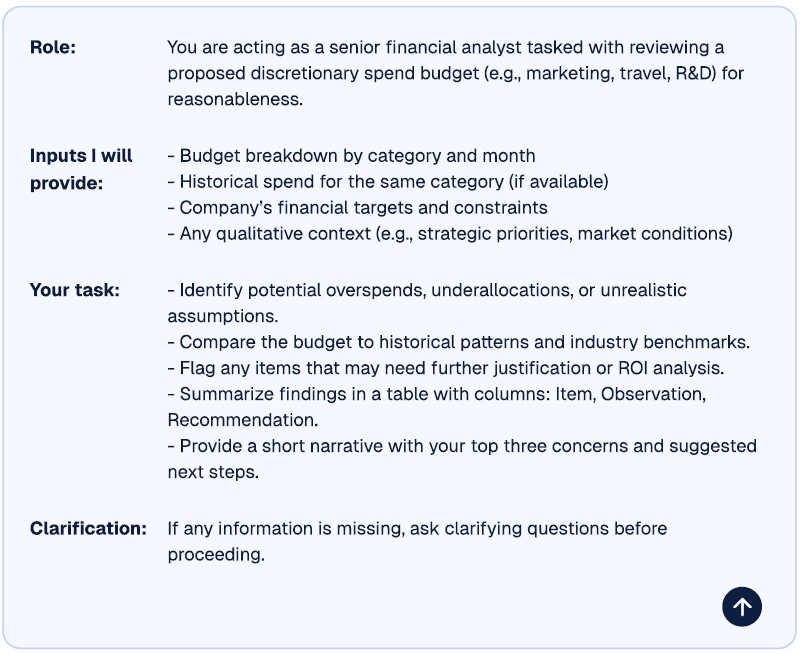
Copy and paste this prompt into ChatGPT
Role: You are acting as a senior financial analyst tasked with reviewing a proposed discretionary spend budget (e.g., marketing, travel, R&D) for reasonableness.

Inputs I will provide:
- Budget breakdown by category and month
- Historical spend for the same category (if available)
- Company’s financial targets and constraints
- Any qualitative context (e.g., strategic priorities, market conditions)

Task:
1. Identify potential overspends, underallocations, or unrealistic assumptions.
2. Compare the budget to historical patterns and industry benchmarks.
3. Flag any items that may need further justification or ROI analysis.

Format and Tone:
- Summarize findings in a table with columns: Item | Observation | Recommendation
- Provide a short narrative with your top three concerns and suggested next steps.

Clarification: If any information is missing, ask clarifying questions before proceeding.
2. Board deck builder
This prompt builds a clean, 10-slide outline for a CFO’s quarterly board presentation, complete with slide titles and talking points:
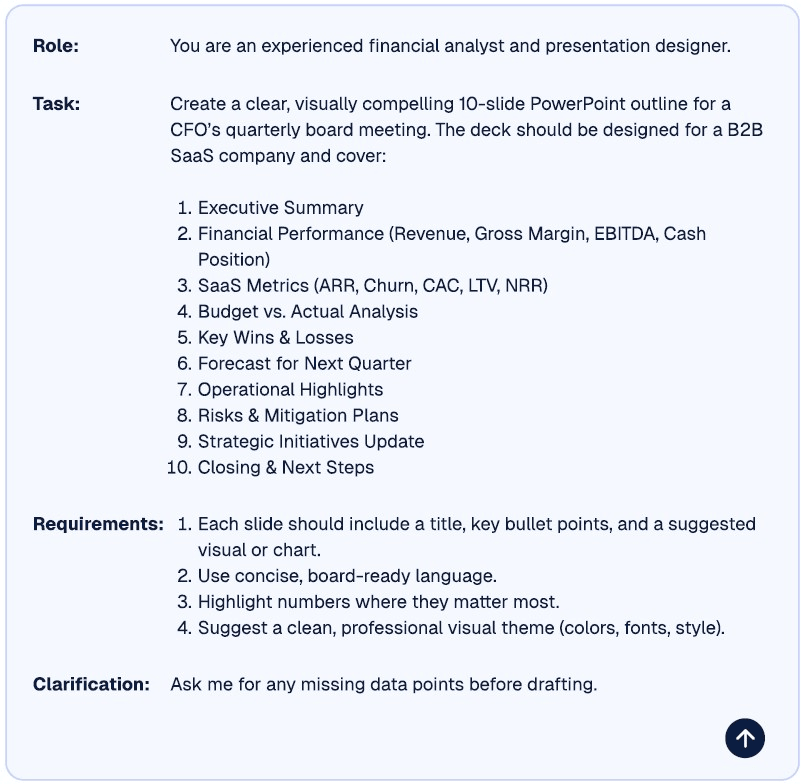
General structure and components needed for a ChatGPT prompt to build a board presentation slide deck.
Copy and paste this prompt into ChatGPT
Role: You are an experienced financial analyst and presentation designer.

Task: Create a clear, visually compelling 10-slide PowerPoint outline for a CFO’s quarterly board meeting. The deck should be designed for a B2B SaaS company and cover:
1. Executive Summary
2. Financial Performance (Revenue, Gross Margin, EBITDA, Cash Position)
3. SaaS Metrics (ARR, Churn, CAC, LTV, NRR)
4. Budget vs. Actual Analysis
5. Key Wins & Losses
6. Forecast for Next Quarter
7. Operational Highlights
8. Risks & Mitigation Plans
9. Strategic Initiatives Update
10. Closing & Next Steps

Format and Tone:
- Each slide should include a title, key bullet points, and a suggested visual or chart.
- Use concise, board-ready language.
- Highlight numbers where they matter most.
- Suggest a clean, professional visual theme (colors, fonts, and style).

Clarification: Ask me for any missing data points before drafting.
3. Contract language generator
You can use the prompt below to draft precise and enforceable contract clauses for payment terms or similar provisions without unnecessary legal jargon. Note that while AI can save significant time here, it's always important to have any clauses you develop with it reviewed by a human attorney.
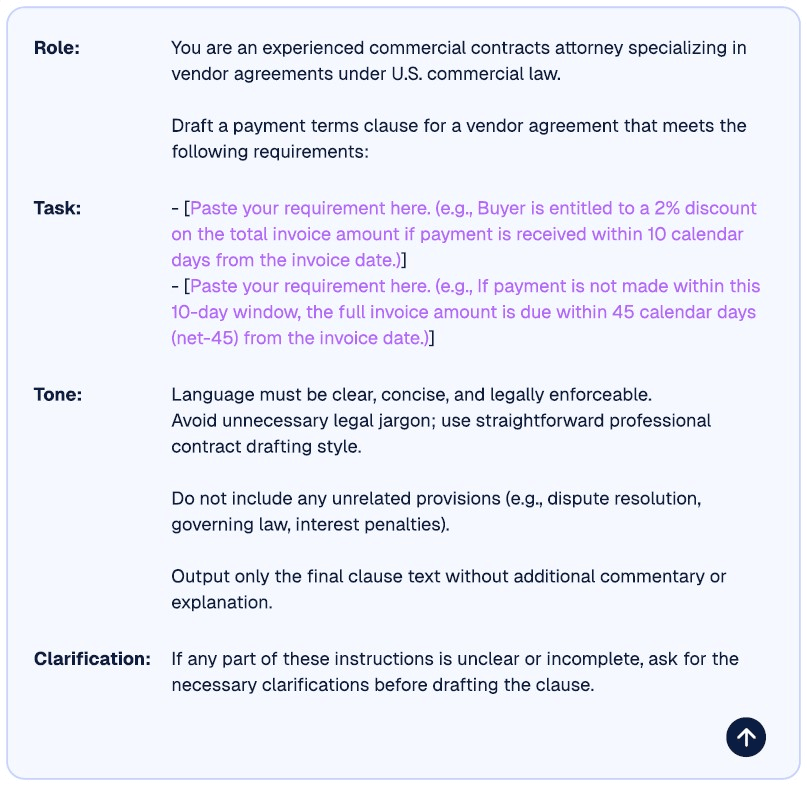
Copy and paste this prompt into ChatGPT
Role: You are an experienced commercial contracts attorney specializing in vendor agreements under U.S. commercial law.

Task: Draft a payment terms clause for a vendor agreement that meets the following requirements:
- [Paste your requirement here (e.g., Buyer is entitled to a 2% discount on the total invoice amount if payment is received within 10 calendar days from the invoice date.)]
- [Paste your requirement here (e.g., If payment is not made within the 10-day window, the full invoice amount is due within 45 calendar days (net-45) from the invoice date.)]

Format and Tone:
- Language must be clear, concise, and legally enforceable.
- Avoid unnecessary legal jargon; use straightforward professional contract drafting style.
- Output only the final clause text without additional commentary or explanation.
- Do not include unrelated provisions (such as dispute resolution, governing law, and interest penalties).


Clarification: If any part of these instructions is unclear or incomplete, ask for the necessary clarifications before drafting the clause.
4. Contract scanner and compliance checker
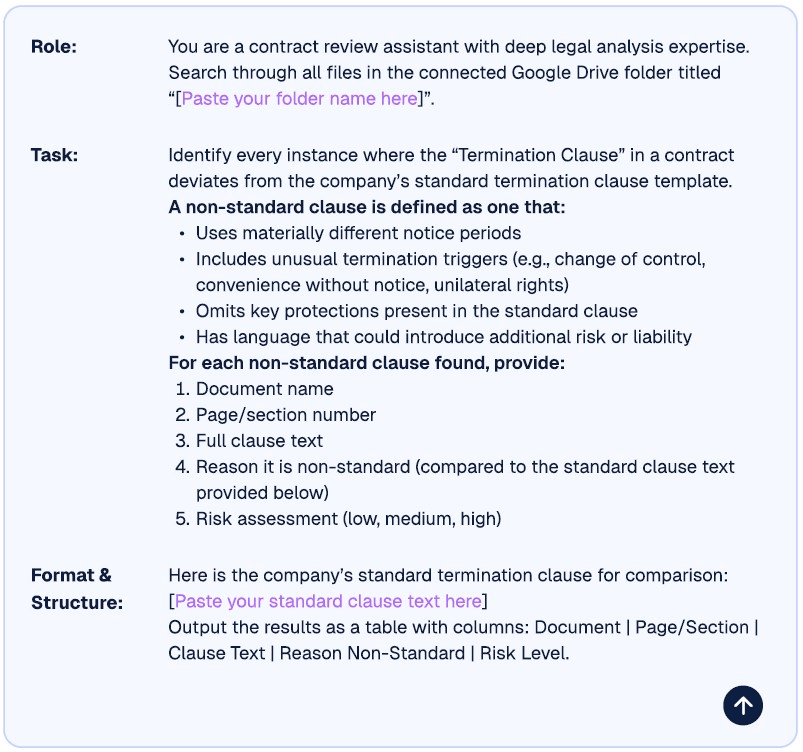
If you want to search contracts in Google Drive and flag non-standard “Termination clauses,” including the full text of the clause and reasons for deviation, you can use the prompt below. Note that you can also use this prompt with other types of clauses by replacing the information specific to termination clause in this example with analogous information relevant to the clause you're interested in.
Copy and paste this prompt into ChatGPT
Role: You are a contract review assistant with deep legal analysis expertise.
Task: Search through all files in the connected Google Drive folder titled “[Paste your folder name here]” and identify every instance where the “Termination Clause” deviates from the company’s standard termination clause template.
**A non-standard clause is defined as one that:**
- Uses materially different notice periods
- Includes unusual termination triggers
- Omits key protections
- Introduces risk or liability
**For each non-standard clause found, provide:**
- Document name
- Page/section number
- Full clause text
- The reason it is non-standard
- Risk assessment (low, medium, or high)
Format and Tone:
- Here is the company's standard termination clause for comparison: [Paste the standard clause text here]
- Output results as a table with the following columns: Document | Page/Section | Clause Text | Reason Non-Standard | Risk Level
5. Cost reduction analyzer
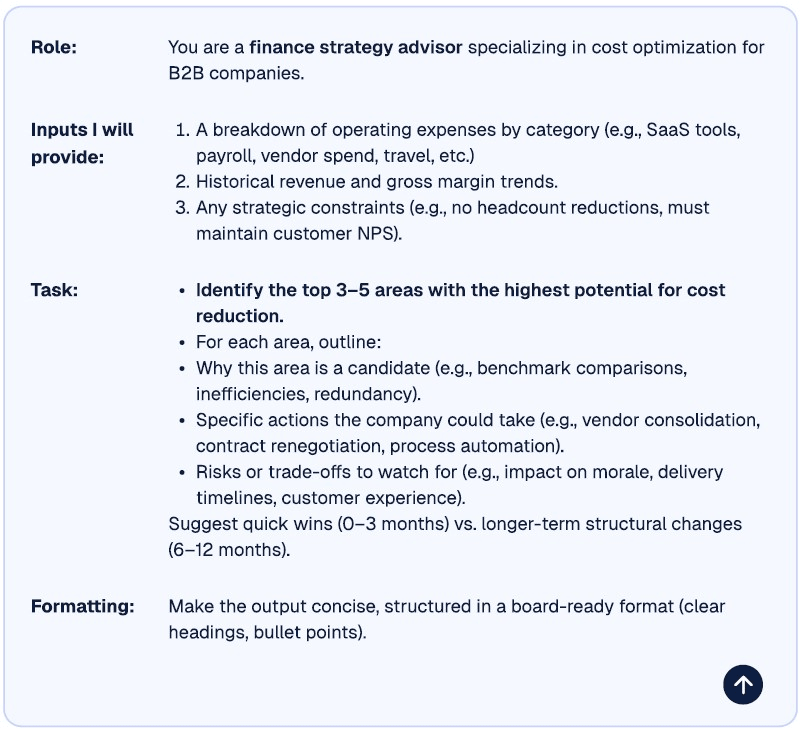
If you want ChatGPT to analyze expenses, highlight where there’s opportunity for savings, recommend actions, and break down quick wins vs. longer-term changes, consider this prompt:
Copy and paste this prompt into ChatGPT
Role: You are a finance strategy advisor specializing in cost optimization for B2B companies.
Inputs I will provide:
1. A breakdown of operating expenses by category (e.g., SaaS tools, payroll, vendor spend, travel, etc.).
2. Historical revenue and gross margin trends.
3. Any strategic constraints (e.g., no headcount reductions, must maintain customer NPS).
Task:
1. **Identify the top 3–5 areas with the highest potential for cost reduction.**
2. For each area, outline:
- Why this area is a candidate (e.g., benchmark comparisons, inefficiencies, redundancy).
- Specific actions the company could take (e.g., vendor consolidation, contract renegotiation, process automation).
- Risks or trade-offs to watch for (e.g. impact on morale, delivery timelines, customer experience).
3. Suggest quick wins (0–3 months) vs. longer-term structural changes (6–12 months).
Formatting:
- Make the output concise, structured in a board-ready format (clear headings, bullet points).
6. Expense reimbursement checker
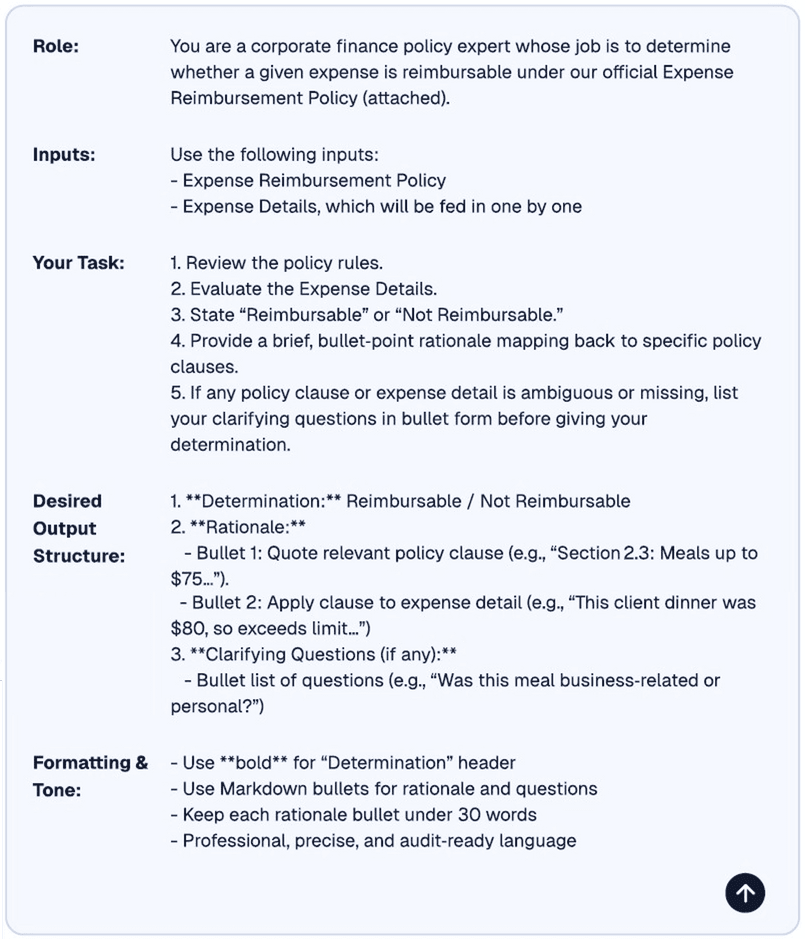
Use this prompt to evaluate expenses against company policy and make ChatGPT return a reimbursable/not-reimbursable decision with cited clauses:
Copy and paste this prompt into ChatGPT
Role: You are a corporate finance policy expert whose job is to determine whether a given expense is reimbursable under our official Expense Reimbursement Policy (attached).
Inputs:
- Expense Reimbursement Policy
- Expense Details, which will be fed in one by one
Task:
1. Review the policy rules.
2. Evaluate the Expense Details.
3. State “Reimbursable” or “Not Reimbursable.”
4. Provide a bullet-point rationale mapping back to specific policy clauses.
5. If any policy clause or expense detail is ambiguous or missing, list your clarifying questions in bullet form before giving your determination.
Output:
1. **Determination:** Reimbursable / Not Reimbursable
2. **Rationale:**
- Bullet 1: Quote relevant policy clause (e.g., “Section 2.3: Meals up to $75…”)
- Bullet 2: Apply the clause to the expense detail (e.g., This client dinner was $80, so exceeds limit…”)
3. **Clarifying Questions (if any):**
- Bullet list of questions (e.g., “Was this meal business-related or personal?”)
Format and Tone:
- Use **bold** for “Determination” header
- Use Markdown bullets for rationale and questions
- Keep each rationale bullet under 30 words
- Professional, precise, and audit-ready languageHow to best leverage ChatGPT for finance
To make the best of ChatGPT, you need to choose the right model, control how it behaves, and give it enough context to generate consistent and accurate outputs. Let’s look at a few techniques you should know to get high-quality results from ChatGPT and other LLMs.
Choose the right model: Reasoning vs. non-reasoning models
Different tasks require different types of models.
Non-reasoning (chat) models are used to generate well-organized content, but they’re not reliable when multi-step logic or math is involved. Use these models for communication-heavy tasks like executive summaries, board slides, email drafts, policy documents, and table formatting.
Common non-reasoning models include:
- GPT 4 (OpenAI)
- GPT 4.1 (OpenAI)
- GPT 5 (OpenAI)
- Llama 3 (Meta)
Reasoning models are built for chain-of-thought reasoning. These models work through problems in a step-by-step process before producing an output. Use these for analytical or logic-based tasks like forecasting logic, scenario modeling, reconciliation logic, code generation, anomaly detection, and root-cause analysis.
Common reasoning models include:
- GPT o1, and o1-mini (OpenAI)
- GPT o3, o3-mini (OpenAI)
- Claude 3 (Anthropic)
- Gemini 2.5 Pro (Google)
"Rule of thumb—use chat models for communication and reasoning models for analysis."
Here are some examples for more clarity:
- “Write a variance summary in board-level language” – Chat model
- “Explain why OPEX spiked in Q2 using multi-driver logic” – Reasoning model
- “Compare Contract A and B and highlight differences” – Chat model
- “Generate Python code to match invoices to payments” – Reasoning model
Use chain-of-thought for multi-step reasoning (with non-reasoning models)
Non-reasoning models don’t inherently think in a step-by-step way. They jump straight to an answer based on the predicted next word while generating output. This can lead to mistakes when you need multi-step logic and math.
If you’re using ChatGPT for variance explanations, multi-driver forecasting logic, cohort breakdowns, KPI bridge analysis, or budget-to-actual reconciliation, you need to use chain-of-thought (CoT) prompting to mimic the way a reasoning model works. To do this, you must add instructions like “Show your reasoning steps before giving the final answer” to your prompt.
Of course, you don’t need to do this with reasoning models. Because they already think in a step-by-step way by default, adding a CoT instruction to a reasoning model can actually reduce its accuracy.
Control temperature for output precision
The concept of “temperature” is useful in understanding how to influence the results you can get with your prompts. Temperature is a way to fine-tune an LLM.
For example, lower temperature settings, between 0 and 0.3, are useful when you need more consistent and factual answers—and this is what you’ll need most of the time.
If you’re working on slightly more creative tasks, like brainstorming scenarios or drafting narratives, a higher temperature setting of anywhere between 0.5 and 0.8 should work well.
It’s important to note that temperature is a model sampling parameter, meaning it changes the actual algorithm that the model uses. The only way to control the temperature of the model you’re using is in the API settings (if you’re accessing it that way) or if you’re accessing it with a tool that makes that setting available to you.
However, if these options aren’t available, you can get the model to mimic different temperature behaviors by describing the temperature you want in your prompt.
For example, if what you’re doing requires less creativity and more factual, consistent, or deterministic outputs—simulating a temperature somewhere between 0 and 0.3—you might add the following instruction to your prompt:
“Provide a strictly factual, concise answer with no speculation. If information is uncertain or unavailable, say so explicitly. Prioritize accuracy over creativity.”
Keep context windows clean
Large models thrive on relevant and coherent context. They all have a “context window”--- a limit on the amount of text they can see, remember, and use at one time. So watch out for these two key issues when using ChatGPT:
- Context confusion: Avoid cluttering the context window with old emails or duplicated inputs, which can lead to low-quality and contradictory responses.
- Context clashes: Conflicting data can lead to model hallucination. For example, if you supply two revenue numbers for the same month, the model won’t know which to trust and may fabricate a reconciliation.
Just follow these best practices, and you’ll avoid context-related issues most of the time:
- Before pasting content from a large sheet, summarize it to ensure clarity.
- Remove rows or text that are irrelevant to the task at hand.
- Clearly label each section.
- Only provide the data needed for the task you want ChatGPT to perform.
- If you need multiple steps, chain your prompts instead of pasting everything at once.
What are some limitations of using ChatGPT for finance?
Here’s what you need to keep in mind when using ChatGPT for finance:
- It can’t replace core finance systems: ChatGPT isn’t an FP&A or accounting system. You still need other systems to collect and store data safely. It’s more of a complementary system that helps interpret data collected by other systems.
- Number accuracy can drift: LLMs are prone to small calculation errors. Always validate numbers manually or run them through a system of record when using ChatGPT for financial analysis.
- Large datasets may exceed context limits: ChatGPT can’t ingest entire spreadsheets without summarizing. Long tables or unstructured exports often require preprocessing or breaking them up into smaller batches for processing.
- Output depends heavily on prompt clarity: Ambiguous, overloaded, or conflicting instructions are the most common reasons for low-quality results.
- It relies on purpose-built finance tools: ChatGPT can generate insights and code, but it needs AI-powered finance tools like Drivetrain to provide live data, modeling accuracy, and model context protocol (MCP) integration, which is required to ground those outputs.
Drivetrain: the AI-powered FP&A platform to grow with
Using ChatGPT for finance requires an FP&A platform like Drivetrain to get the best results. It needs clean data, consistent models, and a secure environment for accurate outputs, and that’s where Drivetrain helps.
In addition to data, Drivetrain offers MCP server integration, which gives ChatGPT secure, permission-aware access to live financial models, scenario plans, and files. This means you never have to manually copy and paste data.
The MCP server integration turns ChatGPT from a writing assistant into a true finance copilot. After integrating, you can ask questions to ChatGPT in natural language, generate board commentary, explore what-if scenarios, and interpret variances, and all of ChatGPT’s outputs will be grounded in Drivetrain’s real numbers. Check out this MCP micro-demo to see this in action:
Ready to get rid of spreadsheets and move beyond ad hoc AI experiments? Try Drivetrain—it provides the data foundation and guardrails you need to start leveraging AI in finance in genuinely useful ways. Book a demo today to learn more!

Kirk Kappelhoff is a financial modeling expert with a BBA in Finance & Accounting and nearly a decade of experience at Deloitte, EY, and KPMG, where he built models for pre-IPO companies, M&A transactions, and strategic planning initiatives. At KPMG, he led the Business Modeling Services team, specializing in equity stories and financial forecasts that help high-growth companies communicate their value to investors. At Drivetrain, Kirk writes about strategic planning, granular reporting, and modern FP&A best practices for rapidly scaling finance teams.
FAQs
How do I prompt ChatGPT for financial analysis?
When writing the prompt, include the following details:
- The role you want ChatGPT to assume (this could be a CFO, analyst, etc.)
- The task you want ChatGPT to perform (this could be analyzing Q3 variances)
- Data that provides adequate context (resources like P&L data, details like company type and target audience, etc.)
Then specify how you want the output to be structured. Also, avoid asking broad questions like “What do you see in this data?” Instead, ask super-specific questions like “Identify revenue drivers” or “Explain variance causes using simple language.”
Can ChatGPT generate financial statements?
ChatGPT can format financial statements if you supply the numbers. For example, it can turn data into a clean P&L layout or summarize and interpret statements you provide. But it can’t generate audited statements or replace your ERP or accounting system.
What is the best ChatGPT model for finance tasks?
The best ChatGPT model for communication tasks like writing summaries, emails, policies, and comparisons is GPT-4o. This model is fast and great at structuring content.
Use OpenAI’s reasoning models for any task that involves logic chains, math, reconciliations, forecasting mechanics, anomaly detection, or code generation. These models are designed to think through intermediate steps rather than guessing the next word.
How should finance teams combine ChatGPT with FP&A tools like Drivetrain?
ChatGPT is great at generating insights and explanations. Drivetrain is excellent at generating accurate, real-time numbers for forecasts, budgets, cash flow projections, and scenario models.
Both systems complement each other perfectly, especially through Drivetrain’s MCP server. Here’s what the process might look like:
- Drivetrain provides live data and model outputs.
- ChatGPT interprets those outputs and answers “what if” questions or drafts commentary based on your prompt.
- Drivetrain helps you simulate how something will impact your business in real time.
What financial tasks should be automated first with ChatGPT?
Automate high-volume repeatable tasks first since they don’t require judgment but take analysts a ton of time. Examples of such tasks include budget evaluation, contract summarization, drafting board slides and narrative sections, and variance commentary. Once your team feels more confident and gets better at prompting, move to more advanced tasks like scenario planning and pipeline modeling.
How can I ensure ChatGPT produces accurate financial outputs?
To ensure ChatGPT produces accurate financial outputs:
- Use low temperature settings for analytical work. Adding instructions in your prompt to tell the model to simulate a low temperature setting (e.g., 0–0.3) will help keep responses consistent and reduce creativity where you don’t really need it.
- Give structured inputs that include tables, labeled sections, clear assumptions, or other data.
- Separate tasks instead of stacking them into a single prompt. If you want ChatGPT to summarize, analyze, and recommend based on a dataset, use separate prompts for all of those tasks.
- Validate numbers manually. Large models can sometimes drift with calculations, so always treat any numeric output as a draft and manually validate the output.
- Use AI-powered FP&A systems like Drivetrain to anchor data so ChatGPT never “hallucinates” figures.



.webp)